
If you own a small business, you already know the problem: customers are searching for exactly what you offer, and your competitors — often bigger, better-funded competitors — are the ones showing up first. Organic rankings take time to build, and in the meantime, every day that goes by is a day those searches go to someone else.
This is where Google Ads for small business owners becomes worth a serious look. Paid search puts your business in front of people who are actively searching for your products or services, right when they’re ready to act. But here’s the part most guides skip: simply turning on a campaign and spending money does not guarantee results. Small business Google Ads accounts fail constantly, not because paid search doesn’t work, but because they’re built without a strategy. This guide walks through how Google Ads actually works, what it costs, and how to build a small business PPC strategy that generates real customers instead of wasted spend.
What Are Google Ads?
Google Ads is Google’s pay-per-click (PPC) advertising platform. Instead of paying a flat fee to run an ad, you typically pay only when someone clicks on it — hence “pay-per-click.” When someone searches a term related to your business, Google runs an instant auction among advertisers bidding on that keyword, and the winning ads appear above (and sometimes below) the organic search results.
Which ads win isn’t just about who bids the most. Google also factors in ad relevance and landing page quality, which is part of why a well-built, focused campaign can outperform a bigger budget with sloppy targeting. Depending on the campaign type, you may pay per click, per view, or per action — but for most small businesses getting started with paid search advertising, standard search campaigns billed per click are the starting point.
Why Google Ads Can Work for Small Businesses
Paid search earns its place in a small business marketing budget for a few specific reasons:
- Purchase intent: Search ads reach people who are actively looking for a solution right now, not passively scrolling.
- Geographic targeting: You can target specific cities, zip codes, or a radius around your location — valuable for a local business.
- Budget control: You set daily and monthly limits, so a small budget stays small.
- Faster visibility: Campaigns can start generating traffic as soon as they’re approved, unlike SEO, which typically takes months to build organic visibility.
- Measurable results: Every click, cost, and conversion is trackable, so you know exactly what your money is doing.
That last point matters more than most small business owners realize going in. Paid search advertising isn’t a leap of faith — it’s one of the most measurable marketing channels available, if it’s set up to track the right things from day one.
How Much Do Google Ads Cost?
“How much do Google Ads cost” is usually the first question small business owners ask, and the honest answer is: it depends. Cost-per-click (CPC) — what you pay each time someone clicks your ad — varies significantly by industry and keyword. Highly competitive industries like legal services or home repair often see CPCs of several dollars or more, while other local services may cost far less.
You control your exposure through daily and monthly budget caps, so there’s no minimum spend required to get started. The bigger mistake isn’t spending too little — it’s chasing the cheapest possible clicks. A $1 click from someone who isn’t a real prospect is more expensive, in the long run, than a $6 click from someone ready to buy. Budgets should be built around what a new customer is actually worth to your business, not around finding the lowest CPC.
Choose Keywords Based on Customer Intent
Keyword selection is the foundation of any small business PPC campaign. The goal isn’t the most searches — it’s the right searches.
- Focus on keywords directly tied to your products or services, not broad industry terms.
- Prioritize commercial and transactional searches (“emergency plumber near me”) over purely informational ones (“how does a water heater work”).
- Use negative keywords to exclude searches that look related but aren’t — this prevents your budget from being spent on clicks that were never going to convert.
- Avoid overly broad match types early on, since they tend to pull in irrelevant traffic before you’ve built enough data to refine them.
A tightly built keyword list, even a small one, will almost always outperform a large, loosely targeted one — both in cost and in the quality of leads it produces.
Write Ads That Give People a Reason to Click
Once the right person sees your ad, the ad copy itself has one job: give them a reason to click instead of scrolling past. Effective small business ads share a few traits: the headline mirrors the language of the search, the body copy highlights a specific benefit rather than a generic claim, and the ad includes a clear call to action. “Free Estimates — Same-Day Service” will consistently outperform “Quality Service You Can Trust,” because it’s specific and actionable instead of vague.
Send Clicks to a Landing Page That Converts
An ad’s only job is to earn the click. The landing page’s job is to convert it — and this is where a surprising number of Google Ads for small businesses campaigns quietly fail. Sending every click to a generic homepage forces visitors to hunt for the offer they just clicked on, and most won’t bother.
- Match the landing page content directly to what the ad promised.
- Keep the call to action clear and immediate — a phone number, a quote form, a booking link.
- Build trust on the page itself with reviews, testimonials, or credentials, since a first-time visitor has no other reason yet to trust your business.

Track the Metrics That Actually Matter
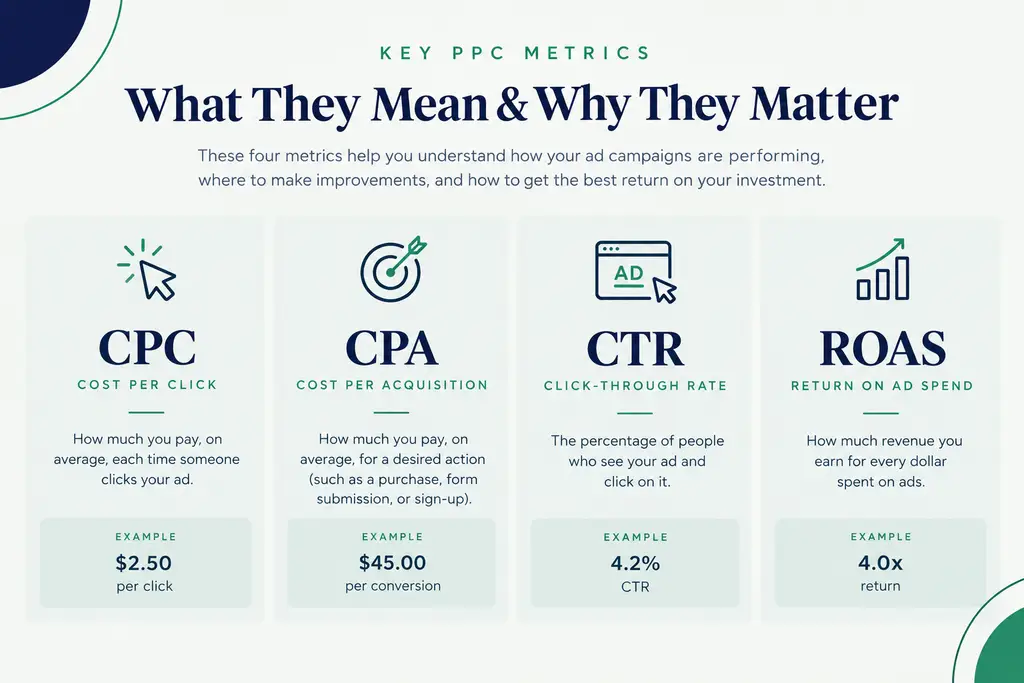
Clicks and impressions feel like progress, but they aren’t the point — conversions are. Understanding a handful of core metrics makes the difference between guessing and actually managing a Google Ads strategy:
- Click-through rate (CTR): The percentage of people who see your ad and click it — a signal of how relevant your ad is to the search.
- Cost per click (CPC): What you pay, on average, per click.
- Conversion rate: The percentage of clicks that turn into a lead, call, or sale.
- Cost per acquisition (CPA): What it actually costs to generate one customer.
- Return on ad spend (ROAS): Revenue generated for every dollar spent on ads.
A campaign with a high CTR but no conversion tracking tells you almost nothing useful. Set up conversion tracking before launching a campaign, not after — it’s the only way to know which keywords and ads are actually producing customers versus which ones are just producing clicks.
7 Google Ads Mistakes Small Businesses Should Avoid
- 1. Targeting overly broad keywords, which wastes budget on searches with no real purchase intent.
- 2. Skipping negative keywords, allowing irrelevant clicks to drain the budget.
- 3. Sending all traffic to the homepage instead of a page built for that specific offer.
- 4. Not tracking conversions, which makes it impossible to know what’s actually working.
- 5. Writing generic ad copy that doesn’t stand out or match the search.
- 6. Spending equally across every campaign instead of shifting budget toward what’s performing.
- 7. Launching a campaign and never optimizing it afterward.
Any one of these mistakes can quietly drain a budget. Most underperforming small business Google Ads accounts we come across have two or three of them happening at once.
How to Know if Google Ads Are Working
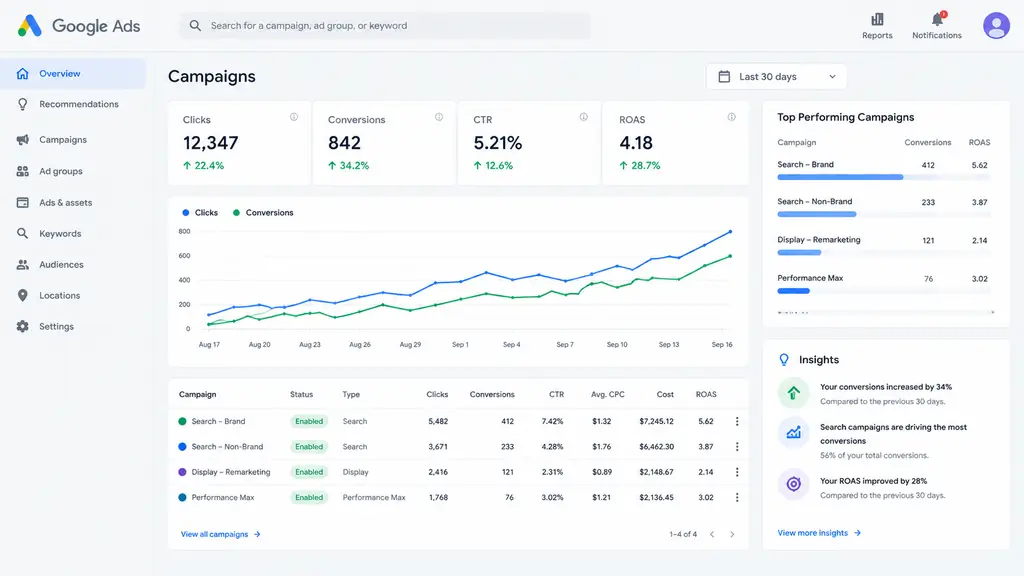
The real test isn’t traffic volume — it’s profitability. Compare what you’re spending on ads against the actual value of a new customer. If your CPA is lower than what a customer is worth to your business, the campaign is working, even if the total spend looks large. If CPA is higher than customer value, no amount of traffic makes that campaign worth running as-is.
- Monitor conversions weekly, not just spend.
- Calculate CPA and ROAS for each campaign, not just the account as a whole.
- Identify which campaigns and keywords are actually profitable.
- Shift budget toward what’s working and pause or fix what isn’t.
Conclusion
Google Ads can be one of the most effective growth channels available to a small business — but only when it’s built around a real strategy, not just a budget and a hope. The goal was never to get the most clicks; it’s to generate profitable customers. That means choosing keywords based on intent, writing ads that speak directly to the searcher, sending clicks to a landing page built to convert, and tracking the metrics that actually reflect business results.
If you’re considering paid search advertising for the first time, start with a focused campaign around your highest-intent keywords, track conversions from day one, and optimize based on real data rather than assumptions. A smaller, well-managed campaign will consistently outperform a larger, unmanaged one.
Want to turn your advertising budget into measurable growth? SCALAR Advertising helps Utah small businesses build and optimize Google Ads campaigns designed to generate real leads and customers.
Explore SCALAR’s Google Ads management services to get started.